Popl: AI Lead Capture
- 4.8
- Rating
- 500.00K
- Installs
- Free
- Price

 Analysis by App-foxy
I have always found business cards slightly awkward: they are easy to forget, easy to lose, and often become another contact that someone has to type into a phone later. Popl: AI Lead Capture takes a different approach by turning a phone into a digital networking tool. After spending time with it, my view is clear: it is most useful for people who meet contacts regularly and need a quicker way to organize those conversations, but it is less compelling if you only exchange details occasionally.
This is a free business app from Popl Co, with a Teen content rating and a current version of 8.3.2. It has built a strong audience, with over 500 thousand installs and an average rating of 4.8 from around 16 thousand ratings. Those figures do not automatically make it right for everyone, but they match my experience of an app that is focused, approachable, and designed around a practical problem rather than a long list of unrelated tools.
How Popl changes the usual business-card exchange
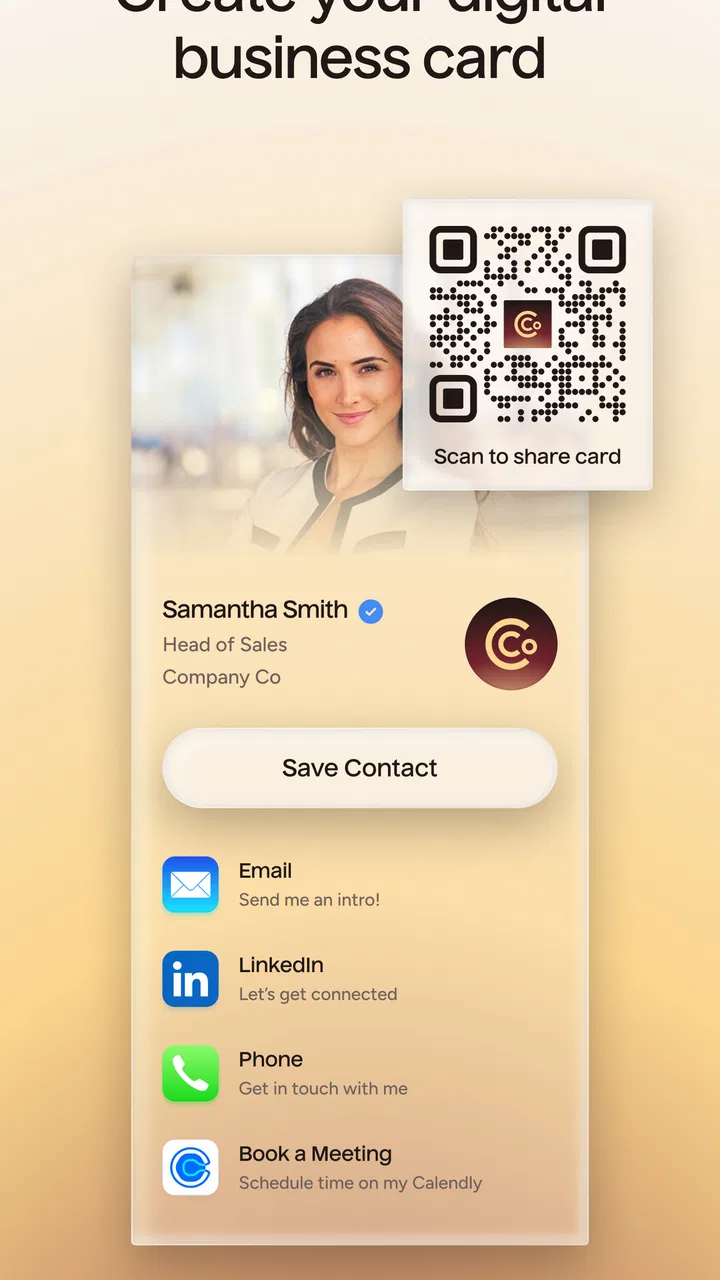
The central idea is simple. Instead of handing over a printed card, I can use a digital profile to share professional contact details. That makes the first exchange faster and gives me more control over what I present. A traditional card is fixed until I print another batch; a digital profile can be adjusted when my role, contact information, or preferred method of communication changes.
You May Also Like

 Blood Strike: 2.5 Anniversary
Blood Strike’s Loadouts Turn Every Drop Into a Tactical Gamble
A close look at Blood Strike’s custom loadouts: how fast access to signature weapons reshapes its battle royale rhythm, rewards preparation, and narrows the gap between fights.

 Pandora - Music & Podcasts
Pandora’s Music Is Easy to Start, but Harder to Recover
Pandora’s strength is its low-effort path from a seed to a station. Its weak spot is how much confidence it asks you to place in connection, setup, and quiet recovery.

 8 Ball Pool
8 Ball Pool Is Built on Rivalries, Rematches, and Routine
A close look at the rivalries, rematches, shared routines, and unanswered safety questions that turn a quick pool match into a persistent mobile community.

 Samsung Music
Samsung Music’s Quiet Strength Is Playing What You Already Own
Its reach comes less from spectacle than from dependable access to a personal library. That simplicity is both the app’s strongest retention engine and its ceiling.

 AccuWeather: Weather Radar
AccuWeather Review: A Quick, Clear Forecast for Everyday Decisions
For everyday plans, the best forecast is the one you can understand quickly. AccuWeather makes rain timing, radar, and local conditions easy to act on, with a few trade-offs.

 Hill Climb Racing
Why Hill Climb Racing Still Turns Crashes Into One More Run
A tiny car, a bumpy hill and one more upgrade: Hill Climb Racing keeps resurfacing because its simple chaos makes every near-miss feel personal.
More From Our News Desk



That flexibility is the strongest reason to use it. I do not have to carry a stack of cards, remember whether the information is current, or ask someone to manually enter every detail. For a freelancer, salesperson, recruiter, consultant, or event attendee, that small reduction in friction can matter. Networking usually fails after the conversation, when both people return to their normal routines and the details are forgotten. A digital handoff gives the contact a clearer next step.
I also like that the app is positioned as more than a digital card. Its store summary describes it as a lead scanner and business-card tool, so the practical value extends beyond presenting my own information. The lead-capture angle is important for anyone who needs to remember where a contact came from and what should happen next. A useful workflow is to treat the app as the first stage of follow-up: exchange details during the conversation, review the captured lead afterward, and then decide which contacts deserve a message.
That workflow is more valuable than simply replacing paper. A digital card alone solves the sharing problem. Lead capture addresses the organization problem that comes afterward. I would not expect it to replace a full customer relationship management system, but it can act as a convenient bridge between a face-to-face meeting and a more structured sales process.
The everyday scenario where it makes the most sense
Imagine attending a trade event where several people ask what you do. With printed cards, I would hand out the same information repeatedly and hope the other person keeps it. With Popl, I can share a controlled digital profile and avoid carrying extra paper. Later, instead of trying to reconstruct the day from memory, I can review the leads I collected and separate promising conversations from casual introductions.
The important detail is discipline. I would not treat every captured contact as equally valuable. My advice is to add a short reminder immediately after a meaningful conversation, while the context is still fresh. A note such as “asked about onboarding” or “send portfolio” is more useful than relying on a name alone. This is one of the less obvious ways to get value from a lead tool: the capture itself is only half the job; the quality of the follow-up cue determines whether the contact becomes useful.
For teams, the same principle can support a shared routine, although the app should not be mistaken for a complete sales platform. A small business could use it at an event, review new contacts at the end of each day, and then move qualified prospects into its existing system. That division of labor is sensible. Popl handles the immediate exchange and collection, while a dedicated customer database handles longer-term account history, reporting, and pipeline management.
What feels better than paper and ordinary contact sharing
The first advantage is control. Printed cards are static, and sending a phone number through a chat app can feel too informal or incomplete. A digital business profile can present several relevant details in one place, which is especially useful when I want to offer more than a name and a telephone number.
The second advantage is speed. A good networking tool should stay out of the way of the conversation. I do not want to spend several minutes explaining how to save my details. Popl is at its best when the exchange feels like a brief handoff rather than a technical demonstration. That makes it a better fit for busy events than a workflow that requires both people to create accounts or type information manually.
The third advantage is reducing repeated data entry. When someone receives a paper card, they still have to decide whether to save it and then enter the information. A digital exchange can shorten that path. This does not guarantee that a person will follow up, but it removes one excuse for postponing the task.
Compared with simply sending a contact through a messaging app, the professional presentation is another distinction. A chat message may be fast, but it can disappear among other conversations. A dedicated business profile is easier to frame as a professional introduction, particularly when I am meeting someone for the first time.
Compared with a full CRM, however, the trade-off is obvious. Popl is more immediate and lighter to use, while a CRM is usually better for assigning ownership, tracking stages, recording long histories, and coordinating a larger team. I would choose this app for the front door of the process, not as the entire building.
Lead scanning is useful, but it needs a careful workflow
The lead-scanning focus gives the app a more practical role at events. Scanning can be much faster than typing every detail, especially when I am dealing with a large number of business cards in a short period. It also helps create a consistent starting point for follow-up instead of leaving a pile of cards on my desk.
Still, scanning should not be treated as a substitute for checking the result. Printed cards can contain unusual names, uncommon domains, small text, or layouts that make automatic reading less reliable. My best practice would be to glance over every captured record before moving on. A few seconds of verification is cheaper than sending a message to the wrong address or losing a promising contact because one character was misread.
There is also a useful distinction between capture and qualification. A scanned card tells me that I met someone; it does not tell me whether that person is a good lead. I would use the app to collect the information, then add personal context and a priority while the meeting is still recent. That makes the tool far more effective than scanning everything and hoping a meaningful sales list appears automatically.
For people who attend only one event a year, this extra process may feel unnecessary. In that situation, a phone camera, a contact app, or a simple note might be enough. Popl becomes more persuasive when networking is a recurring activity and the user is willing to maintain a repeatable capture-and-follow-up habit.
Where the experience can become less convenient
The biggest weakness is that a digital networking system depends on participation. A printed card works even when the other person prefers traditional habits. A digital profile may require a small explanation, and some contacts may still ask for a physical card or want the details sent through a familiar channel. That is not a failure of the app, but it means I would not rely on it as my only networking option in every environment.
There is also a social trade-off. Sharing a complete digital profile can be more polished, but it may reveal more information than I intended if I do not review the profile carefully. I would prepare the profile before an event, remove anything irrelevant to the audience, and check how it looks from the recipient’s perspective. A profile designed for potential clients may not be the same one I would use with recruiters, vendors, or casual professional contacts.
The app is free to start, but it includes in-app purchases ranging from $2.99 to $144.99 per item. That makes it important to think about the level of use before committing to paid options. Someone who only wants a basic digital card may be satisfied without spending more, while a frequent networker or business team may consider additional capabilities worthwhile. I would first test the everyday sharing workflow and only then decide whether a paid upgrade solves a real problem.
Another limitation is the risk of creating a second contact system. If I already have a carefully maintained address book and CRM, adding another place to review leads can create duplication. The app is most effective when I define its role clearly: capture and initial organization here, long-term relationship management elsewhere. Without that boundary, the convenience of collecting information can turn into another inbox to maintain.
Battery, connectivity, and event conditions are also practical considerations for any phone-based networking tool. I would prepare before arriving, keep the profile ready, and avoid depending on a complicated setup during a busy conversation. A printed backup card still has value for situations where a phone exchange is awkward or impossible. The best approach is not digital versus paper as an absolute choice; it is using the digital tool as the main method while keeping a fallback for edge cases.
Small habits that make the app more effective
My first tip is to create different sharing contexts rather than treating one profile as perfect for everyone. A potential customer may need a concise professional introduction, while a collaborator may care more about direct contact details. Keeping the audience in mind makes the exchange feel intentional instead of like a generic information dump.
My second tip is to review leads in batches. After a meeting, I would mark the contact with a short action and then reserve a specific time later that day to sort the list. This prevents constant interruptions during an event while still protecting the details that are easiest to forget. It also makes it easier to identify duplicates and prioritize people who showed genuine interest.
My third tip is to use the app as a conversation aid, not as the conversation itself. A digital card should support a memorable introduction, not replace one. I would mention why I am sharing my details and what the other person can expect next. That simple explanation improves the chance that the contact recognizes the exchange later.
My fourth tip is to keep the profile current before important networking occasions. Since a digital card can be changed more easily than a printed batch, it is tempting to assume it is always ready. I would still check the wording, contact channels, and presentation before an event. The benefit of flexibility only appears when the information is maintained.
Who should use Popl and who should skip it
I recommend it most strongly to people whose work depends on repeated introductions. Independent professionals, field sales representatives, recruiters, agency owners, conference attendees, and small teams can all benefit from reducing the distance between meeting someone and recording the lead. It is particularly suitable for users who are comfortable with a phone-first workflow and who will actually review their captured contacts afterward.
It is also a good choice for someone who dislikes carrying business cards or frequently changes professional details. The free entry point makes it easy to try the basic idea before deciding whether it belongs in a regular workflow. The average rating of 4.8 and the broad install base suggest that many users find the approach useful, though I would still judge it by the kind of networking I personally do rather than by popularity alone.
I would be more cautious about recommending it to someone who rarely meets new contacts, works in settings where paper cards remain expected, or wants a complete sales-management system in one app. A traditional contact book may be simpler for occasional exchanges. A dedicated CRM may be better for teams that need detailed reporting, automation, permissions, and long-term pipeline control. Popl sits between those options: more organized than a casual exchange, but lighter than a full business database.
Compatibility is also worth checking before installation. The app supports Android 7.0 and later, which covers many devices, but anyone using an older phone should confirm that the device can run it. On iOS, I would still keep the same practical expectations: this is a tool for digital business-card sharing and lead capture, not a replacement for every contact or sales application.
My final verdict after using it as a networking tool
Popl: AI Lead Capture is strongest when the real problem is not sharing contact details but remembering what to do with them afterward. Its digital-card approach is faster and more flexible than printed cards, while the lead-scanning focus gives it a useful role at events and meetings. I appreciate that it can sit at the beginning of a broader workflow without forcing every user to adopt a heavyweight sales platform.
Its limitations are equally clear. It depends on people being comfortable with digital exchanges, it still requires careful checking and follow-up, and paid options may matter to users who need more than a basic introduction. It also should not become a duplicate CRM by accident.
For me, the recommendation is straightforward: use it if you regularly meet prospects, collaborators, or professional contacts and want a cleaner bridge from introduction to follow-up. Skip it if your networking is occasional or if you already have a system that handles digital cards and lead organization without friction. As a free Business app from Popl Co, it earns its place by making a narrow but common task easier, especially when I use it with a clear routine rather than expecting the app to manage the entire relationship for me.
FAQs for Popl: AI Lead Capture
01What is Popl: AI Lead Capture?
Popl: AI Lead Capture is a cutting-edge application designed to streamline the process of capturing and managing leads. It uses artificial intelligence to efficiently collect contact information, organize it, and help businesses follow up with potential clients. The app integrates with various CRM systems, making it a powerful tool for marketers and sales teams.
02How does Popl: AI Lead Capture work with CRM systems?
Popl seamlessly integrates with popular CRM systems, allowing users to automatically sync captured lead information. Once a lead is captured, it's instantly transferred to your CRM, ensuring that all data is stored in one central location. This helps eliminate manual entry and reduces the risk of errors, improving overall data management.
03Is Popl: AI Lead Capture easy to use for beginners?
Yes, Popl is designed with user-friendliness in mind, making it accessible even for beginners. The app features an intuitive interface that guides users through each step of capturing and managing leads. Additionally, it offers tutorials and support to assist new users in getting started and maximizing the app's potential.
04What makes Popl: AI Lead Capture different from other lead capture apps?
Popl stands out due to its AI-powered features that enhance lead capture efficiency and accuracy. Unlike traditional apps, it offers automated data entry, real-time updates, and smart insights, helping businesses prioritize leads and make data-driven decisions. Its seamless CRM integration further distinguishes it from competitors.
05Are there any costs associated with using Popl: AI Lead Capture?
Popl offers a variety of pricing plans to suit different business needs. While there may be a free version with basic features, premium plans provide access to advanced functionalities such as CRM integrations and detailed analytics. It's advisable to review the pricing structure on their official website to choose the plan that best fits your requirements.
Pros
- Easy setup process for new users.
- Integrates smoothly with CRM systems.
- Accurate lead data collection.
- Customizable landing pages available.
- Real-time analytics and insights.
Cons
- Limited offline functionality.
- Higher tiers can be pricey.
- Occasional syncing issues reported.
- Requires stable internet connection.
- Learning curve for advanced features.

Popl: AI Lead Capture
Gallery